myfans Sign-Up and Payment Guide [2026 Edition]
If you're on the fence about signing up for myfans, you're probably wondering about two things: "is registration a hassle?" and "what payment methods can I use?" Short answer: signing up itself takes about a minute, and all you need is an email address or an X account. This article walks through the sign-up steps, the types of payment methods available, and the points where people tend to get stuck with payments.
📌 The short version (3 lines)
- ・All you need to sign up is an email address (or X account) and a nickname. No need to register your real name, phone number, or credit card upfront
- ・Besides credit cards, there are also pay-later services for people without a credit card
- ・Payment errors are usually caused by "card restrictions" or "browser extensions," and the fixes are fairly predictable
What this article covers
What you need to sign up, and the actual sign-up steps
When age verification actually kicks in
What payment methods are available
How to deal with payment errors
Things worth knowing before you pay for anything
1. What you need to sign up
Based on multiple sources we checked, if you're just using it as a fan, what you actually need is pretty minimal.
📧
Email address
or X
🔑
Password
👤
Nickname
(no real name needed)
🔞
Confirmation
you're 18+
Registering a phone number or entering a credit card at sign-up is reportedly not required. This low barrier is exactly why so many guides describe signing up as something you can do "in a minute."
2. Sign-up steps
Access the official site
Watch out for unofficial copycat sites in search results. You can reach the official myfans homepage here.
Select "Yes" on the age verification screen
A screen confirming you're 18 or older appears the moment you access the site.
Sign up via email (or link your X account) from "Sign Up"
Enter your email address, password, and nickname.
Click the link in the verification email to finish
Clicking the link in the email sent to your registered address completes your account setup.
3. When age verification actually kicks in
The age verification for "just watching" and the identity verification for "operating as a creator" are two very different levels.
If you're just watching
Just a click
A screen simply asks "Are you 18 or older?" when you access the site. No documents required.
If you're becoming a creator
ID verification required
You're reportedly required to submit ID — like a driver's license or "My Number" card — via "Identity Verification" in My Page.
4. Payment methods you can use
Based on the actual payment screen, these are the 5 payment methods available.
| Method | Details |
|---|---|
| Credit card | Supports VISA, Mastercard, JCB, and AMEX. The most common method, and the fastest to process. |
| Pay-later (convenience store / bank ATM) | Pay afterward via convenience store or bank ATM, without using a credit card. |
| atone next-month payment | A pay-next-month service supporting convenience store payment or direct bank debit. |
| Paidy | A pay-later service supporting convenience store payment or bank transfer. |
| BitCash | A prepaid electronic money you charge in advance at a convenience store, etc. Good for people who want to manage their budget. |
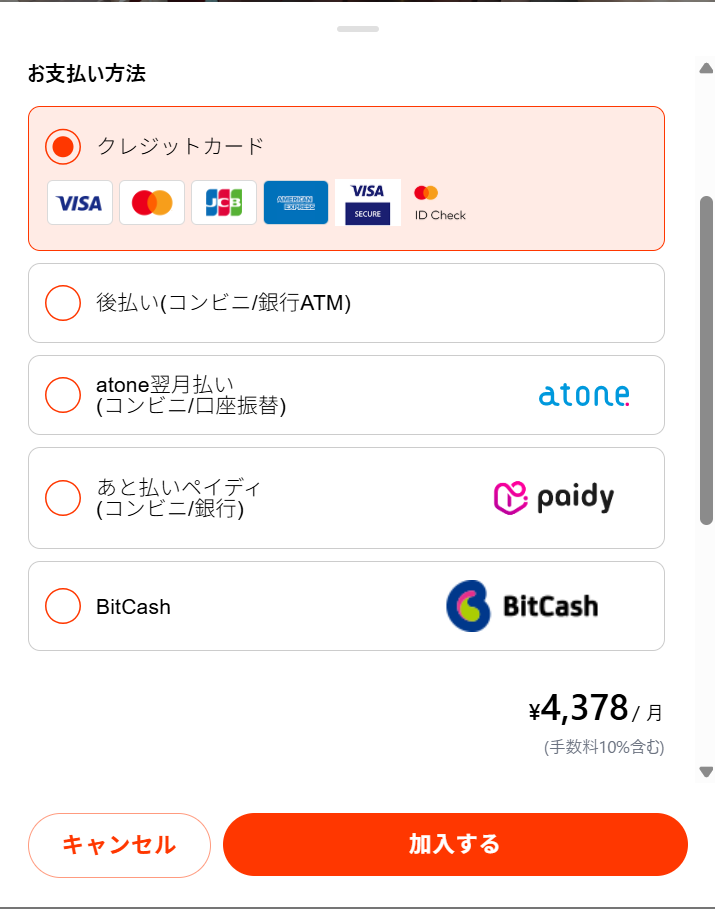
The actual payment method selection screen (when subscribing to a plan)
💡 The displayed price already includes a 10% fee
The price shown on the payment screen (for example, "¥4,378/month") already includes a 10% fee charged to the fan. The amount you're actually billed is slightly higher than the creator's stated plan price — worth keeping in mind.
5. How to deal with payment errors
Quite a few people apparently get stuck with an error the first time they try to pay. Here's a rundown of common causes and fixes.
Your card gets declined
Common causes reportedly include exceeding your spending limit, online payment restrictions, failed 3D Secure authentication, or an expired card. Try a different card, or contact your card issuer directly to be sure.
It keeps failing no matter how many times you try
Browser extensions like ad blockers can interfere with payment processing. Turning them off, or trying incognito mode or a different browser, reportedly resolves this in some cases.
A pay-later service declines you
Check that your phone number can receive SMS, and that you still have available credit with the pay-later service.
6. Things worth knowing before you pay for anything
- The name that shows up as the billing source on your credit card statement is reportedly not fixed, and depends on the card issuer. If you share a statement with family, it's worth checking this in advance
- Your payment method can reportedly be changed before your next billing cycle in most cases
- If you're using a card issued overseas, a separate foreign exchange fee may apply
If you want to know more about payment safety, check out Is myfans safe to use? as well. For the steps to cancel a plan, see myfans cancellation and unsubscribing guide.
Common questions
Q. Does just signing up cost anything?
A. Account registration itself is free. You're not charged unless you actually subscribe to a plan or make an individual purchase.
Q. Can I use it if I don't have a credit card?
A. It reportedly supports pay-later services like Paidy and atone, as well as prepaid electronic money, so you may be able to use it without a credit card.
Q. If I sign up with my X account, will my followers find out?
A. Linking your account reportedly doesn't trigger a notification to your followers, but if you're worried, signing up with an email address instead is the safer choice.
Summary
Signing up for myfans itself takes about a minute if you have an email address and a nickname ready. The trickier part is actually the payment side — it helps to know your alternatives if you can't use a credit card, and how to handle payment errors. If you run into trouble, prioritize checking the guidance on the actual payment screen, and use this article as a general reference.
※Payment methods, fees, and error details are subject to change. Please prioritize checking the actual on-screen information.
Check the full plan details and posts for any creator you like on their profile page.
Browse myfans creators →